1Overview
Audit requires an initialised project and complete required Project Attributes. The Audit form can switch profiles, filter report/XML feature classes and generate either a concise or full technical PDF report. infrADAC ACAD and infrADAC BCAD can also show transient failed-asset highlights. infrADAC DCAD discovers infrADAC and native nested Adac assets, validates their current live 12d geometry and reports failures without transient audit graphics.
Throughout design development and before every export or receiver submission.
2Before you begin
- Initialise the project and save current changes.
- Complete Project Attributes and Drawing Extents.
- Load or select the receiver profile used for validation.
3What audit validates
Pass/fail is a combination of project, profile, geometry and attribute rules.
| Feature or choice | Current behaviour |
|---|---|
| Project validation | Checks required project structure, values, coordinate pairs/floats and extents while ignoring designated export-only paths.A project can fail before individual assets are considered. |
| Asset validation | Checks profile membership, standard/supplementary class, geometry compatibility, ADACId, required attributes, GUIDs and supporting files. infrADAC DCAD classifies current vertices from every element in a logical ADACId group rather than trusting cached geometry metadata.The report identifies the asset and failed rule; missing live infrADAC DCAD geometry is reported instead of replaced with synthetic geometry. |
| Report options | Full Technical Report includes detailed asset sections; filters can limit report/XML feature classes.Review and export scope can match the intended submission. |
| Complex geometry/package controls | Export-only controls become enabled only when audit passes and relevant assets/options exist.Risky conversion and packaging cannot run against a failed audit. |
4Run, interpret and resolve an audit
Use the report category and exact failed field to choose the repair, then rerun under the same profile.
Run the audit
Project validation occurs before the asset scan.
- Run
ADACAudit. - If required Project Attributes are missing, choose Yes and complete them.
- Wait for the Audit form to finish scanning the current project/model.
Choose parameters
The selected profile defines validity.
- Confirm the profile.
- infrADAC ACAD and infrADAC BCAD: enable Highlight Failed Assets when visual review is useful; infrADAC DCAD uses the report because native transient highlights are unavailable.
- Choose Full Technical Report for detailed asset sections or leave it off for a reduced report.
- Use the Audit Report/XML Filter to include only intended feature classes.
Interpret the results
Start with status and counts, then open the report.
- Review Audit Status, Assets Detected and Assets Passed.
- Compare Standard and Supplementary counts.
- Open Report and work through project issues, type/profile failures, geometry mismatches and required-attribute failures.
Correct and rerun
Each report entry should lead to a supported repair.
- Use Find/XData/Edit for infrADAC ACAD and infrADAC BCAD attribute issues; use exact-UID Edit in infrADAC DCAD.
- Use Generate, a supported Clone mode or geometry correction for type or geometry issues.
- Use Drawing Extents, supporting-file repair and Clean only where the active product supports them.
- Rerun audit until the intended profile passes.
5Product differences
Audits the AutoCAD database and can show transient failed-asset highlights.
infrADAC BCAD runs the same profile validators against BricsCAD entities.
infrADAC DCAD discovers infrADAC flat and native nested Adac elements, groups them by logical ADACId and validates current live 12d vertices through the shared audit/report engine. Cached geometry is compatibility metadata only; native transient audit highlights are not available.
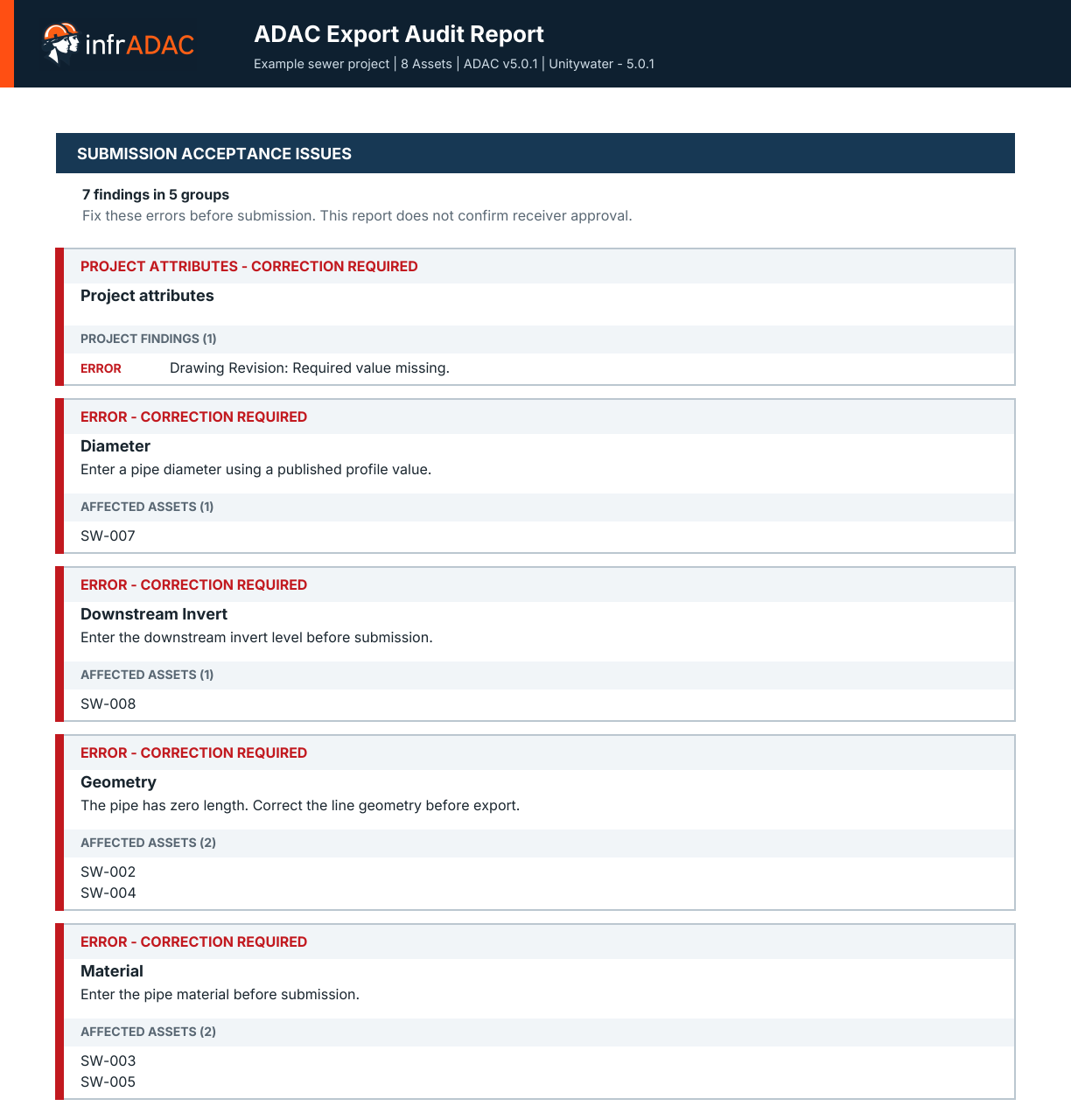
Read the PDF report
The current report separates submission acceptance findings from the detailed data quality review. Each finding explains what needs attention and identifies the affected assets.
6Troubleshooting
Audit will not start
Run ADACNew and complete required Project Attributes. The command deliberately blocks an uninitialised project.
An asset is Not In Profile
Load the correct profile, add the supplementary definition or remap the asset to a type that the receiver profile contains.
The report file is locked
Close it in Word, rerun audit and let infrADAC replace the temporary report. A file-in-use prompt prevents silent corruption.